Why Crypto Security Is Critical?
In the world of cryptocurrency, you are your own bank—and with that freedom comes absolute responsibility. Unlike traditional finance where banks can reverse fraudulent transactions or reset your password, cryptocurrency operates on an irreversible, decentralized system. Once your funds are gone, they’re gone forever.
The stakes have never been higher. In 2024 alone, cryptocurrency thefts exceeded $1.7 billion, with sophisticated phishing attacks, exchange hacks, and social engineering scams targeting both newcomers and experienced users. The decentralized nature of blockchain technology means there’s no customer service hotline to call, no insurance policy to claim, and no “undo” button when things go wrong.
Cryptocurrency Theft Data (Up to 2025)
| Year | Approx. Amount Stolen (USD) | Key Notes |
| 2022 | ~ 3.8 B | Record year for crypto hacks and exploits. |
| 2023 | ~ 1.0 B | Sharp decline vs 2022 — improved DeFi security. |
| 2024 | ~ 2.2 B | Losses surged again; several large protocol breaches. |
| 2025 (YTD) | ~ 2.17 B | Includes Bybit hack (≈ 1.5 B), largest in history. |
Sources: Chainalysis (2025 Mid-Year Report), Reuters (Dec 2024), Elliptic, Investopedia. Note: Figures are approximate and may differ slightly between reports due to ongoing recovery or valuation updates.
But here’s the empowering truth: most crypto losses are preventable. By implementing proper security practices, you can protect your digital assets as effectively as any institution protects theirs—perhaps even better.
This comprehensive guide walks you through the essential security practices every cryptocurrency user must know, organized by priority from the most critical foundations to advanced privacy techniques. Whether you’re holding $100 or $100,000 in crypto, these practices will help you sleep soundly knowing your assets are secure.
Best Practices for CryptoCurrency Security
1. The Golden Rule: Secure Your Private Keys and Seed Phrase
This is the single most important rule in all of cryptocurrency. If you remember nothing else, remember this: Whoever controls the private keys controls the funds.
- Private Key: A complex string of numbers and letters that acts as the password to your crypto assets on the blockchain. It mathematically proves ownership.
- Seed Phrase (Recovery Phrase): A human-readable list of 12, 18, or 24 words that generates all the private keys in your wallet. It is a master key to your entire wallet.
How to Secure Them:
- Never Digitize It: Do not store your seed phrase on your phone, in a text file, in an email, or in cloud storage (like Google Drive or iCloud). These are connected to the internet and vulnerable to hackers.
- Write It Down: Physically write it down on a durable material like fire/water-resistant metal (e.g., Cryptosteel, Billfodl) or high-quality paper with archival ink.
- Make Multiple Copies: Create 2-3 copies and store them in separate, secure, and private locations (e.g., a safe, a safety deposit box).
- Never Share It: No legitimate company, developer, or support agent will ever ask for your seed phrase. Anyone who does is a scammer.
2. Use a Hardware Wallet for Significant Holdings
For any amount of cryptocurrency you wouldn’t feel comfortable losing, a hardware wallet (a form of “cold storage”) is non-negotiable.
- What it is: A physical device (like a USB stick) that stores your private keys offline, completely isolated from internet-connected devices.
- Why it’s secure: To sign a transaction, the transaction details must be physically approved on the device itself. Even if your computer is infected with malware, a hacker cannot access your keys.
Top Recommendations: Ledger, Trezor, Cold Card.
Must read: List of Best Crypto Cold Wallet
3. Enable Robust Two-Factor Authentication (2FA)
For any exchange account or online service connected to your crypto, you must enable 2FA. This adds a second layer of security beyond your password.
- Avoid SMS 2FA: While better than nothing, SIM-swapping attacks can bypass SMS-based 2FA.
- Use an Authenticator App: Opt for app-based 2FA like Google Authenticator or Authy. These generate codes on your device, which are not vulnerable to SIM swaps.
- Consider a Security Key: For the highest level of security, use a physical security key like a YubiKey for 2FA, which provides phishing-resistant protection.
4. Become a Phishing and Scam Detective
Scammers are creative and relentless. Your skepticism is your best defense.
Common Scams to Avoid:
- Fake Airdrops & Giveaways: You see a post from a “celebrity” or project saying, “Send 1 ETH to this address and receive 5 ETH back!” This is always a scam. Legitimate airdrops are free.
- Rug Pulls & Ponzi Schemes: A new DeFi project offers impossibly high yields. Once enough people invest, the developers pull all the liquidity and disappear. Stick to well-audited, established projects.
- Fake Wallets & Exchange Impersonations: Scammers create fake apps in official app stores or set up websites that look identical to real exchanges (e.g., “Binance-support.com”). Always double-check URLs and only download apps from official links.
- Malicious Browser Extensions: Some browser extensions for wallets or portfolio trackers can be malicious and steal your data. Only install well-reviewed extensions from trusted developers.
How to Stay Safe:
- Bookmark Official Sites: Always access your exchanges and dApps through bookmarked official URLs.
- Verify Smart Contracts & dApps: Before connecting your wallet to a new dApp, do your research. Check community sentiment and look for audit reports from firms like CertiK or Trail of Bits.
- Never Click Suspicious Links: Be wary of links in emails, DMs, or on Discord/Slack. Hover over them to see the real URL first.
5. Practice Safe Exchange and Hot Wallet Usage
While hardware wallets are for savings, “hot wallets” (software wallets connected to the internet) are useful for smaller, active funds.
- Treat Exchanges as Checking Accounts: Exchanges are great for trading, but they are custodial (they hold your keys). Do not store large amounts long-term on an exchange.
- Use Dedicated Wallets: Consider using a separate, dedicated hot wallet (like MetaMask) for interacting with dApps and DeFi, rather than your main storage wallet.
- Withdraw to Your Own Wallet: After purchasing crypto on an exchange, withdraw it to your personal hardware or software wallet.
6. Maintain Device and Network Security
Your crypto’s security is only as strong as the device you access it from.
- Use Anti-Malware Software: Run reputable antivirus and anti-malware software and perform regular scans.
- Keep Everything Updated: Regularly update your computer’s operating system, wallet software, and browser. These updates often contain critical security patches.
- Use a VPN on Public Wi-Fi: Avoid accessing your crypto wallets or exchanges on public, unsecured Wi-Fi. If you must, use a reliable VPN.
- Practice Password Hygiene: Use a strong, unique password for every crypto-related account. A password manager (like 1Password or Bitwarden) is essential for generating and storing these complex passwords.
7. Implement a Solid Backup and Recovery Strategy
What happens if your house floods or your hardware wallet breaks? A recovery plan is crucial.
- Test Your Backups: When you set up a new wallet, practice recovering it with your seed phrase before sending significant funds to it. Send a small test amount, reset the wallet, and recover it to ensure you wrote the phrase down correctly.
- Secure Document Storage: As mentioned, use metal backups for fire/water resistance. Inform a trusted family member or lawyer about the location of one backup in case of an emergency.
Common Cryptocurrency Scams and How to Avoid Them
The crypto space, unfortunately, is rife with scams targeting both newcomers and experienced users. Being able to identify red flags and avoid common scams is just as important as technical security. In this section, we’ll cover some of the most prevalent crypto scams – and how you can spot and sidestep them before it’s too late.
Fake Airdrops and Giveaway Scams
Who doesn’t like free crypto? Scammers know this and frequently use fake airdrops, giveaways, or “free token” offers to lure victims. These scams take many forms: you might receive an unsolicited token/NFT in your wallet with a link to claim a prize, see a social media post where a celebrity “doubles your crypto,” or get a DM about a bonus airdrop. The common theme is promise of free or multiplied cryptocurrency – but you’ll end up losing instead.
Scammers often lure victims with fake “free crypto” offers or airdrops that are actually traps to steal funds. Unsolicited tokens or messages promising rewards are major red flags. For example, you might randomly find a spam NFT or token in your wallet labeled “Free Airdrop – Claim Now.” The attached link leads to a phishing website that asks you to connect your wallet to claim your reward.
If you do, the site might prompt a transaction that actually drains your wallet or requests your seed phrase. Another variant is the classic Twitter/YouTube giveaway scam, where scammers impersonate famous individuals or crypto companies. They post forged messages and websites claiming “Elon Musk is doing a 5000 BTC giveaway!” and ask you to “verify your address” by sending a small amount of crypto – which they keep, and you get nothing back.
How to avoid airdrop/giveaway scams:
- Be skeptical of any “free crypto” offer. Legitimate airdrops never ask you to send funds first or enter your private keys. If it sounds too good to be true (e.g., “we’ll double your ETH”), it is. No billionaire or company is randomly giving out large amounts of crypto on social media.
- Never send cryptocurrency to claim a prize or verify your wallet. Scammers often say “send 0.1 ETH to verify your address and we’ll send back 1 ETH.” This is always a scam. Once you send, it’s gone. Real promotions or airdrops will not require you to pay upfront.
- Don’t click links in unexpected token drop messages. If you receive an unknown token in your wallet, do not interact with it (don’t try to swap or follow links in its data). It could be a dusting attack or bait to get you on a malicious site. You can ignore it or use your wallet’s hide feature.
- Verify through official channels. If you think an airdrop or giveaway might be real, check the official website or social media of that project or person (not the link provided by the potential scam). For instance, if a giveaway claims to be by Binance or Uniswap, the official Binance or Uniswap sites/news will mention it if it’s legit. When in doubt, ask the community (e.g., on the official Discord/Reddit) before acting.
- Watch out for urgency and FOMO tactics. Scammers love to pressure you with time-limited offers (“Only the first 100 will get this!”) to make you act without thinking. Legitimate airdrops usually don’t appear out of nowhere with extreme urgency. Take your time and do research; the opportunity won’t vanish unless it’s fake and they want to rush you.
In short: treat unsolicited crypto freebies like you would those infamous “Nigerian prince” emails – with extreme doubt. By being cautious and following the above steps, you can safely navigate and ignore the sea of fake airdrops and giveaway scams out there.
Rug Pulls and Ponzi Schemes
The crypto world has seen its share of fraudulent investment schemes, notably rug pulls in DeFi and classic Ponzi setups. These scams prey on the fear of missing out, promising outsized returns only to leave investors holding worthless tokens or nothing at all.
Rug Pulls: A rug pull happens when developers of a crypto project (often a new DeFi token or NFT project) suddenly abandon it and run off with investors’ money. In DeFi rug pulls, the devs typically create a token, hype it to drive the price up, then use their control to withdraw all liquidity or mint a huge supply of tokens, crashing the value to zero.
Early 2025 saw fewer rug pull incidents than 2024, but losses from rug pulls skyrocketed – nearly $6 billion in early 2025 alone (up from $90 million the year before). This shows that while they may be less frequent, rug pulls are targeting larger pools of money. Rug pulls often involve memecoins or unaudited DeFi protocols**, where anonymous founders can exploit trust. For instance, scammers might create a honeypot token that people can buy but not sell, or they’ll heavily pre-mine tokens for themselves and dump them on the market after retail piles in.
Ponzi/Pyramid Schemes: These are scams where returns for older investors are paid directly from new investors’ money – there’s no real revenue or profit being generated. In crypto, Ponzi schemes might masquerade as high-yield investment programs, mining pools, or trading bots. They promise guaranteed high returns (e.g., “1% per day” or “Double your BTC in a month”) to lure people in.
Early participants may indeed get payouts (to make the scam appear legit), but those funds come from the deposits of newer participants. Eventually, when new money stops coming in, the whole scheme collapses and the organizers disappear with the remaining funds. The hallmark signs are unrealistic returns, lack of transparency about how returns are generated, and often multi-level referral bonuses. If a crypto investment’s returns sound unbelievable and there’s an emphasis on recruiting others, it’s likely a Ponzi.
How to avoid rug pulls and Ponzi schemes:
- Do thorough research (DYOR) on new projects. Don’t just trust hype or influencers. Check if the project has a credible team (with public profiles), a whitepaper or audited code, and an active community. If the developers are anonymous and the project is only a few days old but pushing people to invest quickly, be extremely cautious. Rug pulls often have red flags like: liquidity is controlled by dev wallets, code that allows minting of new tokens, or promises that “this token will 100x in a week.” Community-driven sites (like certain subreddits or analysis on TokenSniffer, etc.) can help flag suspicious tokens.
- Beware of high, guaranteed returns. In legitimate investing, there are no guarantees, and high returns usually come with high risk. If someone promises you a steady 10% weekly return or similar with no risk, it’s almost certainly a scam. Ponzi schemes rely on the allure of easy money. Remember: if the profits sound magical, the underlying business is likely imaginary.
- Be cautious with new DeFi projects that haven’t been audited. DeFi rug pulls often happen in unaudited protocols or those quickly forked from existing code. Look for projects that have reputable audits and take time to understand the basics of how the protocol works. Check if liquidity is locked in a smart contract (and for how long) or if devs can withdraw it. If one wallet owns a huge percentage of the liquidity or token supply, that’s a risk (they could dump it). Also note, even audits aren’t foolproof, but they add a layer of assurance.
- Watch out for pressure tactics and cult-like marketing. Ponzi schemes often encourage you to “get in now” and recruit friends, sometimes even flaunting testimonies or lifestyles (e.g., leaders renting luxury cars to appear successful). If a project’s community is more about shilling and less about tech, and dissenting questions are banned or ignored, steer away. Legitimate projects welcome tough questions; scammy ones do not.
- Only invest what you can afford to lose, especially in new projects. This way, if something turns out to be a scam, it won’t be financially ruinous for you. Many experienced crypto investors treat unaudited new tokens as gambling – they might dabble with a very small amount. Novices should perhaps avoid them entirely until they can identify risks better.
- Learn from history. Familiarize yourself with past scams (Bitconnect was a famous crypto Ponzi, various DeFi rug pulls like the “Squid Game” token, etc.). Scams often rhyme if not repeat. By knowing these stories, you can more easily recognize the patterns and avoid falling for similar schemes.
The bottom line: high-return crypto opportunities demand high skepticism. It’s safer to miss out on a moonshot than to get caught in a scam that goes to zero. If you keep your guard up and practice due diligence, you can avoid the traps of rug pulls and Ponzis while focusing on legitimate investments.
Fake Wallets and Exchange Impersonation
Another common scam vector is the use of fake software or websites that impersonate real crypto services. This includes phony wallet apps, counterfeit exchange websites, and fake login pages – all designed to steal your credentials or keys.
- Fake wallet apps: Scammers have published malicious versions of popular wallets (like MetaMask, Trust Wallet, etc.) on mobile app stores or clone websites. These apps often have names and logos very similar to the real ones, tricking users into installing them. Once installed, a fake wallet might ask you to input your seed phrase (under the guise of restoring or syncing), which it then sends to the scammer. Or it may let you create a wallet but secretly send your private key off to bad actors. For example, there have been fake MetaMask mobile apps in the past that stole seeds, and even sophisticated trojans that mimic wallet interfaces. Similarly, malicious browser extensions have been found that imitate the MetaMask extension – if installed, they can hijack your wallet or funnel your data to attackers.
- Exchange and website impersonation: You might receive emails or see ads for what appears to be a legit exchange (like a Binance login page, or a Coinbase promo) but it’s actually a phishing site. Scammers register lookalike domains (using homoglyphs or extra words, e.g., coinbase.support.com or binance-giveaway.net) and copy the official website’s design. If you log in or enter info, it’s sent straight to the attacker. Another angle is fake customer support: scammers create social media profiles or Telegram groups pretending to be official exchange support and then trick users into giving up passwords or 2FA codes. Always remember that real support will never ask for your password or 2FA codes, and they typically don’t reach out unsolicited.
- Hardware wallet phishing: Even hardware wallet users are targeted via impersonation. For instance, some people received fake Ledger devices in the mail after a data leak – the fake device came with instructions to install a compromised software that would then steal their keys. Others get emails claiming to be from Ledger or Trezor urging a “security update” – with a link to a fake site to enter your recovery phrase. The rule here: hardware companies will never ask for your seed phrase online. Only input that on the device itself.
- Fake crypto exchanges or trading platforms: These might be entirely fictional exchanges or OTC desks that look professional but once you deposit funds, you cannot withdraw (or they demand more money under the guise of “tax” or “verification” – a common scam approach). Always ensure an exchange is legitimate and licensed if applicable. Check reviews, verify their domain, and see if they’re referenced on trusted resources.
How to avoid fake wallet and exchange scams:
- Download apps/extensions only from official sources. For wallet software, go to the project’s official site (e.g., metamask.io or trustwallet.com) and follow their links to the App Store/Google Play or browser extension store. Double-check the publisher name on the store (MetaMask’s should be ConsenSys Software Inc., for example). If you’re installing a browser extension, you can also check the number of users and reviews – a fake will usually have far fewer downloads. Never install a wallet app from a random link or QR code someone sent you.
- Bookmark important websites and use those bookmarks. For exchanges, wallet web interfaces, block explorers, etc., save the correct URL and always use that. This helps you avoid typos and fake sites. For instance, if you use Binance frequently, bookmark https://www.binance.com and use that instead of searching each time. Consider using a password manager, which will only autofill on the exact correct domain – if you visit a fake, the password manager won’t recognize the URL.
- Check the URL and security certificate. When on a crypto site, look for the padlock and HTTPS in the address bar. Click the padlock to see the certificate details – the issuer and that it’s valid for the domain you expect. Many phishing sites might still have HTTPS (lets encrypt makes that easy), so also scrutinize the domain name itself character by character. Keep an eye out for replacements like “0” for “o” or slight misspellings.
- Never enter your seed phrase or private key on a website. The only time you should ever input your recovery phrase is in a wallet app you trust (for example, initializing a new device or official app to restore your wallet). If any website or form asks for your 12/24 words, it is a scam – legitimate services do not need your keys. MetaMask even has warnings that no site or support will ever ask for your Secret Recovery Phrase.
- Verify communications from exchanges/hardware manufacturers. If you get an email about your exchange account, don’t click links – instead, go directly to the exchange site or app and check if the message is legit. If Ledger or Trezor emails about an update, cross-check on their official website or Twitter before doing anything. It’s good to have 2FA on your email as well, to prevent email takeovers that lead to further phishing.
- Use official support channels. If you need help with an exchange or wallet, find their verified contact methods (support ticket system, official support email, or community channels listed on their site). Do not trust random people on Telegram or Reddit who DM you claiming to be support – this is a huge issue in crypto communities. For example, if you post “My MetaMask is stuck” on a forum, dozens of fake “support” messages might flood in. Only trust info from official sources.
- Stay informed of known scams. Often, the community will circulate warnings about new phishing sites or fake apps. Following reputable crypto news sites or the official blog of the wallet you use (many have Security sections) can alert you. For instance, MetaMask’s support site has guides on how to spot phishing and lists known fake variants.
By staying vigilant and adhering to these practices, you can avoid falling prey to the many impersonation scams out there. It boils down to trusting but verifying every software and site you interact with. Trust only the authentic, and verify via multiple sources if something seems off. Remember, scammers can copy logos and UI, but they can’t easily fake a whole community of users or a long-standing domain name reputation.
Malicious Browser Extensions and Mobile Apps
This category overlaps with the above, but it’s worth emphasizing because many crypto users rely on browser extensions (for wallets like MetaMask) and various mobile apps, which have become prime targets for scammers.
Malicious extensions can hide in plain sight – for example, in 2023-2024 there were reports of over 150 fake MetaMask extensions on the Chrome and Firefox stores, placed by a hacking group, which collectively stole around $1 million in crypto. These extensions were designed to look legitimate but would steal secret phrases or alter receiving addresses. On mobile, Android in particular has seen fake wallet apps or DeFi apps that manage to slip past app store review temporarily.
How to stay safe from bad extensions/apps:
- Stick to well-known extensions and check the publisher. For crypto wallets, go directly to the official website and use their provided link to the Chrome Web Store, Firefox Add-ons, etc.. Once there, look at who the author is and how many users/downloads it has. A fake might have only a few hundred users and an odd publisher name, whereas the real MetaMask extension has millions of users and the verified publisher. When in doubt, you can search for news or community discussions – usually, fake extensions get called out on Twitter or Reddit when discovered.
- Limit the number of extensions you use. Each browser extension has potential access to data on your browsing. Only install extensions you absolutely need, and review their permissions. If you stop using one, remove it. The fewer extensions, the smaller the attack surface.
- For mobile, only use official app stores (Google Play Store, Apple App Store) and even then, be cautious. Read the reviews – if others mention that an app stole their money or is fake, obviously avoid. Check the number of downloads and the developer’s name and website. A fake wallet app might have a generic developer email and no real website. The genuine one will link to the official site.
- Be wary of apps that ask for unnecessary permissions. A wallet app typically wouldn’t need access to your contacts or microphone, for instance. If an app requests weird permissions, that’s suspicious. On Android, you can often see permissions before installing.
- Keep an eye on official warnings. Wallet teams often publicly warn users about fakes. For example, MetaMask Support has articles on deceptive sites and extension safety, and hardware wallet companies frequently tweet about scam apps or browser extensions to avoid. Subscribing to these alerts can give you a heads-up.
- If you suspect an extension is behaving oddly, remove it immediately. Signs might include your browser slowing down, unexpected pop-ups asking for your seed, or transaction addresses being altered. There are stories of clipper malware in extensions that change the pasted address when you send crypto (to send to the hacker instead). Always double-check the address you paste or scan matches the intended one. If something doesn’t match up, you might have malicious software active.
- Consider using separate browsers for crypto vs general use. Some users have a dedicated browser (with only their wallet extension installed) for interacting with crypto, and use a different browser for casual surfing. This can minimize the chance of accidentally installing a bad extension on your “crypto browser” or encountering web-based exploits while your wallet extension is unlocked.
In essence, treat your browser and apps with the same caution as your wallet – they are part of the security chain. A malicious extension or app can undo other safeguards, so it’s vital to only use trusted software. With careful attention and by following best practices (official sources, checking reviews, minimal permissions), you can drastically reduce the risk of unknowingly installing a crypto-thieving app.
Check the list of cryptocurrency scams
Actionable Cryptocurrency Security Checklist
- I have written down my seed phrase on metal/paper and stored it securely.
- I have never stored my seed phrase digitally or shared it with anyone.
- I use a hardware wallet for my long-term holdings.
- I have enabled app-based 2FA (Google Authenticator/Authy) on all exchange accounts.
- I use a password manager and have unique, strong passwords for every service.
- I have bookmarked the official sites for my frequently used exchanges and dApps.
- I am skeptical of “too good to be true” offers and never send crypto to receive more.
- I keep my computer’s OS and wallet firmware updated.
- I have tested my wallet recovery process with a small amount of crypto.
Recommended Cryptocurrency Security Tools and Resources
To help implement the best practices above, here’s a list of reliable tools and resources that can enhance your crypto security:
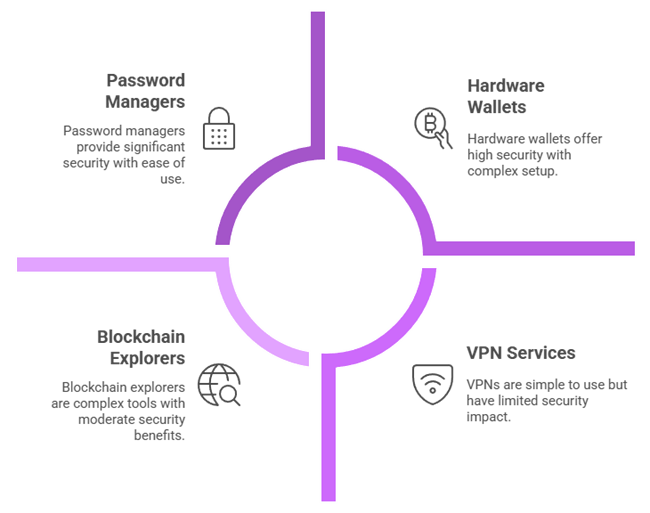
- Hardware Wallets: Devices like Ledger Nano X, Trezor Model T, or Coldcard are top choices for cold storage. They securely store your private keys offline and require physical confirmation for transactions, greatly reducing hack risks. Use them for significant holdings. Tip: Only purchase from the official manufacturer or authorized resellers to avoid tampered devices.
- Password Managers: Use a reputable password manager (such as 1Password, Bitwarden, or LastPass[^1]) to generate and store strong unique passwords for your crypto exchange accounts, email, and other services. This makes it easy to use 16+ character complex passwords and avoid reusing them. Most password managers also have autofill, which can prevent you from entering credentials on phishing sites (since they won’t autofill on an incorrect domain).
- Two-Factor Authentication (2FA) Apps: Google Authenticator, Authy, or Microsoft Authenticator are commonly used to generate 2FA codes. Authy has cloud backup (encrypted) for convenience, while Google’s is more bare-bones. For maximum security, consider a hardware 2FA token like YubiKey – you can link these to exchanges (if supported) and your password manager, adding a physical key requirement to logins.
- VPN Services: A trustworthy VPN (such as NordVPN, ExpressVPN, ProtonVPN, etc.) is useful especially when you must access your crypto accounts on public or untrusted internet connections. A VPN will encrypt your traffic and hide your IP, protecting against local network snooping. Note: Use a no-log VPN service and be aware that VPNs protect against certain threats (like Wi-Fi eavesdropping) but not all (they won’t stop malware on your device, for instance).
- Anti-Malware Software: Ensure you have a good antivirus/anti-malware program active. Windows Defender is decent and built-in, but you can add others like Malwarebytes for on-demand scans. On macOS, consider tools like Malwarebytes as well (yes, Macs can get malware too). Keep these tools updated and run regular scans, especially if you frequently download new software. They can catch known keyloggers, trojans, clipboard hijackers, and other malware before damage is done.
- Blockchain Explorers: Tools like Etherscan (for Ethereum and tokens), Blockchain.com Explorer or Blockstream.info (for Bitcoin), BscScan, Solscan, etc., are invaluable for verifying information. Use explorers to confirm addresses and transactions independently. For example, if someone provides you a wallet address to pay, you can look it up on an explorer to see if it’s been active or if it’s labeled as suspicious. Explorers also often have built-in token approval checkers (Etherscan can show what dApps have access to your wallet).
- Permission Revocation Tools: As mentioned, Revoke.cash and Etherscan’s Token Approval Checker are handy resources to review and revoke smart contract permissions on your Ethereum wallet (and similar tools exist for other chains). Bookmark these and do a routine clean-up of dApp permissions.
- Phishing/Scam Alert Resources: Websites like Bitcoinabuse database or Scam Alert sections on forums can help identify known scam addresses. Also, following crypto security experts on Twitter (e.g., @CertiK, @SlowMist, or project-specific security accounts) can keep you updated on the latest threats and scams to watch out for. Some community-driven sites (like Tokensniffer or rugdoc.io) provide quick analyses of token contracts for scam characteristics – useful if you’re considering a new token.
- Educational Resources & Communities: Knowledge is your best defense. Consider resources like CoinTelegraph’s Anti-Fraud section, r/CryptoSecurity on Reddit, or Binance Academy articles on security. Many of these cover real-world examples of scams and security tips. Engaging with communities (carefully) can also help; for instance, asking advice on r/cryptocurrency about a new platform might surface other users’ experiences (just beware of scammers in replies – rely on consensus and reputable members).
Using these tools in combination will create a robust security arsenal. For example, a hardware wallet secures your keys, the password manager and 2FA secure your accounts, a VPN secures your connection, and antivirus secures your device. Meanwhile, explorers and revocation tools help you monitor and manage what you’ve authorized. While it might seem like a lot, each tool addresses a specific risk, and together they significantly harden your overall security.
Conclusion and Key Takeaways
Cryptocurrency empowers you to be your own bank, but that comes with the responsibility of being your own security officer. By now, you should appreciate that crypto security is not a one-time setup, but an ongoing mindset of vigilance and good practices. Threats will evolve, but the principles you’ve learned – protecting keys, using strong authentication, verifying everything, and preparing for the worst – will remain effective in safeguarding your assets.
Let’s recap the most important takeaways from this guide:
- Guard your private keys and seed phrases with your life. Keep them offline, secret, and backed up in multiple safe places. They are the single point of failure for your crypto – treat them as such.
- Leverage hardware wallets and 2FA to add layers of defense. A hardware wallet keeps your coins offline, and two-factor authentication protects your accounts. These make it exponentially harder for attackers to succeed.
- Stay alert to scams and think before you click. Phishing, fake giveaways, and social engineering are everywhere. Always double-check URLs, distrust unsolicited offers, and never give out sensitive info just because someone asks. No legitimate entity will mind you taking a moment to verify – only scammers push urgency.
- Practice good cyber hygiene. Use strong unique passwords (with a manager), secure your devices and networks (VPN, antivirus, updates), and isolate your crypto activities when possible. Your computer and phone should be fortress-like if they hold or access crypto.
- Plan for the unexpected. Back up your data and seeds, and have a recovery plan. Whether it’s device failure, lost access, or an unfortunate event, being prepared means your crypto isn’t lost along with the mishap.
Finally, remember that proactive security is far easier than reactive recovery (and often, recovery isn’t even possible in crypto). The efforts you put into securing your setup may feel tedious, but they can save you from disastrous losses. The crypto landscape will always have risks – hacks, scams, human errors – but by following the best practices in this guide, you tilt the odds heavily in your favor.
Stay informed, stay cautious, and continuously educate yourself as new threats emerge. With the right tools and mindset, you can enjoy the benefits of cryptocurrency while greatly minimizing the dangers. Your financial sovereignty is worth the effort. Happy (and secure) hodling!
N.B: LastPass suffered a notable security breach in 2022, so if you use it, ensure you have a strong master password and consider other options. The breach underscored the importance of using trustworthy password managers and practicing good master password hygiene.