Top GPU for Mining
Mining is the process of confirming blockchain transactions and adding new blocks. Miners use computing power to solve problems that keep the network secure and earn cryptocurrency rewards. GPU mining is popular because graphics cards handle many calculations at once, making them more efficient than regular processors for most algorithms.
A GPU matters because it affects hash rate, energy use, and stability. Stronger GPUs can improve rewards, but real-world factors shape results. Electricity costs differ by region and can reduce profit. Some areas also have rules that limit mining. Market changes and hardware prices add more risk.
Mining is never guaranteed profit. It needs planning, maintenance, and a budget for power and cooling. Understanding these points helps set realistic expectations and choose a setup that fits your goals.
What is GPU Mining?
GPU mining is the process of using a graphics processing unit to solve the mathematical problems that secure a blockchain network. When a GPU completes these calculations, it helps validate transactions and supports the creation of new blocks. In return, miners can earn cryptocurrency rewards.
A GPU is well-suited for this work because it can process many tasks at the same time. This parallel computing power makes it much faster than a standard CPU for most mining algorithms. GPU mining is also flexible. It allows miners to switch between different coins based on performance or profitability.
Although GPU mining can generate rewards, it involves costs and risks. Electricity use, heat management, and hardware wear all influence long-term results. Understanding these points helps beginners decide if GPU mining matches their budget, goals, and location.
How to Evaluate a Mining GPU?
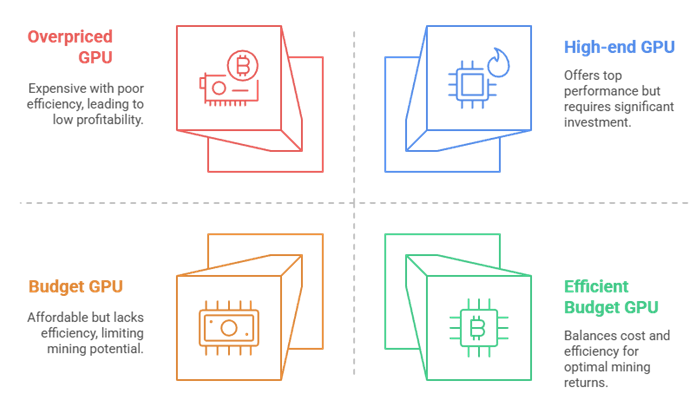
Evaluating a mining GPU requires looking at a few key metrics that directly affect performance and long-term profitability. Each factor plays a role in how well the GPU handles mining tasks and how much it costs to run.
- Hash Rate: This is the most important metric. It measures how quickly the GPU can solve mining calculations. Higher hash rates mean the card can process more work in less time, which increases potential rewards.
- Power Draw: Mining runs hardware nonstop, so power use matters a lot. A GPU with a high hash rate but excessive power consumption may cost more to operate than it earns. Always compare power draw to your local electricity rate.
- Cost of the GPU: Upfront price influences how long it takes to recover your investment. Expensive cards can perform well, but the payback period may be longer. Balancing cost and capability usually leads to better results.
- Efficiency: Efficiency is the hash rate divided by power consumption. A highly efficient GPU delivers strong performance with less electricity. This improves profit margins and reduces heat output.
- Other Overheads: Cooling, maintenance, risers, and a reliable power supply add to total expenses. Space, noise, and air circulation also affect long-term stability. Evaluating these extra needs helps you choose a GPU that fits your budget and setup without unexpected costs.
Top GPU for Crypto/Bitcoin Mining
Choosing the top GPU for crypto or Bitcoin mining depends on finding the right balance between power, efficiency, and long-term durability. The best GPUs deliver strong hash rates without wasting energy or creating excessive heat. A smart pick can improve stability, reduce costs, and support steady earnings across different mining algorithms.
1) ASUS ROG Strix AMD Radeon RX 5700XT
Quick Overview
| Specification | Details |
| Architecture / Process | AMD 2nd-generation 7 nm technology |
| Boost Clock | Up to ~2035 MHz |
| Stream Processors | 2560 stream processors |
| Memory | 8 GB overclocked GDDR6 |
| Interface | PCI Express 4.0 (up to ~16 GT/s) |
| Display Outputs | 3 × DisplayPort 1.4 + 1 × HDMI 2.0b (supports up to 6 monitors) |
| Cooling / Thermal | Triple Axial-Tech 0 dB fans + IP5X dust-resistance |
| Manufacturing / Build Quality | Auto-Extreme manufacturing, Max-Contact heatsink, Super Alloy Power II components |
The ASUS ROG Strix AMD Radeon RX 5700XT harnesses 7nm Radeon architecture, a 2035 MHz boost clock, 2560 stream processors, and 8GB of GDDR6 memory. Hence, it delivers strong, stable performance—qualities that also make it appealing for GPU mining for crypto/bitcoin within its efficiency class. With support for up to six displays through DisplayPort and HDMI, it offers versatile connectivity while maintaining fast data flow using PCIe 4.0, which doubles bandwidth for smoother, more responsive operation.
Its advanced cooling system uses Triple Axial-Tech 0dB fans and an IP5X dust-resistant design to keep temperatures under control during extended loads typical in mining scenarios. Auto-Extreme manufacturing and Max-Contact technology further enhance durability by improving heatsink contact and ensuring long-term reliability for continuous GPU-intensive tasks.
Altogether, the card blends robust construction with efficient thermal performance, giving users a dependable option when seeking a GPU capable of both high-end graphics and the sustained workloads common in crypto-mining environments.
2) ZOTAC Gaming GeForce RTX 3090
Quick Overview
| Specification | Details |
| Memory Size & Type | 24 GB GDDR6X (384-bit) |
| Memory Speed | 19.5 Gbps |
| Boost Clock | 1710 MHz (OC version) |
| Architecture | NVIDIA Ampere, 2nd Gen Ray Tracing Cores & 3rd Gen Tensor Cores |
| Max Digital Resolution | 7680 × 4320 |
| Display Outputs | 3 × DisplayPort 1.4a + 1 × HDMI 2.1 |
| Multi-Display Capability | Quad Display support |
| Slot Size / Cooling | 2.5-slot design, IceStorm 2.0 Advanced Cooling, FREEZE Fan Stop, Metal Frontplate & Lighted Backplate |
| Recommended Power Supply / Power Consumption | Recommended ~750 W PSU, Power Consumption ≈ 350 W |
| Interface & Features | PCIe 4.0, HDCP 2.3, VR Ready, DirectX 12 Ultimate, Vulkan RT, OpenGL 4.6 |
The ZOTAC Gaming GeForce RTX 3090 delivers elite performance powered by the NVIDIA Ampere architecture, combining 2nd-gen Ray Tracing Cores and 3rd-gen Tensor Cores to handle cutting-edge visuals and demanding workloads with ease. Its massive 24GB 384-bit GDDR6X memory running at 19.5 Gbps and a 1710 MHz boost clock ensure smooth 8K gameplay and exceptional content-creation capability, making it ideal for users who need extreme graphical power for VR-ready experiences and ultra-high-resolution displays.
Designed for reliable cooling, the card features IceStorm 2.0 advanced thermal engineering, freeze fan stop, active fan control, and a sturdy metal frontplate with a lighted backplate. SPECTRA 2.0 RGB adds customizable style, while its efficient 2.5-slot design supports quad-display setups through three DisplayPort 1.4a ports and one HDMI 2.1 output.
With support for DirectX 12 Ultimate, Vulkan RT, and OpenGL 4.6, plus a recommended 750W power supply for safe operation, the RTX 3090 offers a future-ready platform. Hence, it excels when used for high-resolution gaming, creative rendering, or advanced simulation tasks.
3) EVGA GeForce GTX 1660 SC Ultra Gaming
Quick Overview
| Specification | Details |
| Boost Clock | 1830 MHz |
| Memory | 6 GB GDDR5 (6144 MB) |
| Memory Bus Width | 192-bit |
| Memory Bandwidth | 192 GB/s |
| CUDA Cores | 1408 |
| Architecture | NVIDIA Turing (GTX 16-series) |
| Cooling / Acoustics | Dual-fan design for higher performance cooling and quieter noise |
| Overclocking Utility | Built for EVGA Precision X1 (monitor/overclock) |
| Max Digital Resolution | 7680 × 4320 |
| Multi-Monitor Support | Up to 3 monitors |
| Minimum PSU Requirement | 500 W or greater power supply |
The EVGA GeForce GTX 1660 SC Ultra Gaming delivers strong, efficient performance powered by NVIDIA’s Turing architecture, offering enhanced realism, speed, and reliability for everyday workloads. With a real boost clock of 1830 MHz and 6GB of GDDR5 memory, it provides stable output that also makes it useful for light to moderate mining, where consistent efficiency matters.
Its dual-fan cooling system keeps temperatures low and acoustics quiet, allowing the GPU to maintain steady performance during long gaming or mining sessions. This balance of cooling power and silent operation helps ensure smoother, more dependable results.
For users who enjoy tuning, the card integrates seamlessly with EVGA Precision X1, enabling advanced monitoring and professional-level overclocking. Meanwhile, this encourages users to avoid unofficial software to maintain stability and protect hardware performance.
4) MSI Gaming GeForce RTX 3090
Quick Overview
| Specification | Details |
| Chipset | NVIDIA GeForce RTX 3090 |
| Video Memory | 24 GB GDDR6X |
| Memory Speed | 19.5 Gbps |
| Memory Interface Width | 384-bit |
| Maximum Digital Resolution | 7680×4320 |
| Video Outputs | 3× DisplayPort 1.4a, 1× HDMI 2.1 |
| Cooling Design | MSI TRI FROZR 2 Thermal Design |
The MSI Gaming GeForce RTX 3090 delivers the power and stability that crypto and Bitcoin miners rely on, combining NVIDIA’s Ampere architecture with amassive 24GB GDDR6X memory bank and a fast 19.5 Gbps memory speed to maintain efficient hashing performance even during long mining sessions. Its 384-bit memory interface and support for ultra-high resolutions highlight raw bandwidth that also benefits heavy computational workloads.
MSI’s TRI FROZR 2 thermal design keeps temperatures controlled and noise minimal, ensuring the GPU maintains consistent performance while operating under the sustained load typical in mining environments. This reliable cooling is especially valuable when rigs run continuously, helping preserve hardware longevity without sacrificing efficiency.
With DisplayPort 1.4a and HDMI 2.1 outputs and TITAN-class performance, this BFGPU offers exceptional stability for miners who need dependable, official-software-only operation. This makes it an excellent choice for users aiming to maximize mining output while keeping systems cool and consistent.
5) AMD Radeon RX 6500 XT
Quick Overview
| Specification | Value |
| Stream Processors | 1024 |
| Game Clock | 2650 MHz |
| Boost Clock | 2820 MHz |
| Memory Speed | 18.0 Gbps |
| Digital Max Resolution | 7680 × 4320 |
| Memory Interface (4 GB version) | 64-bit |
| Memory Size | 4 GB GDDR6 |
| Country of Origin | China |
| Recommended PSU | ~400 W system power |
The AMD Radeon RX 6500 XT delivers smooth, responsive gameplay with its 1024 stream processors and rapid 18.0 Gbps memory speed, giving users reliable performance for modern titles. Its game clock of 2650 MHz and boost clock of 2820 MHz help maintain consistency during demanding sessions.
Supporting a digital maximum resolution of 7680×4320, this card ensures crisp visuals for high-resolution displays and is built to handle everyday entertainment as well as creative workloads. Manufactured in China, it offers a dependable balance of speed and efficiency suitable for compact gaming systems.
Its practical use shines in setups where users want strong frame rates without excessive power demands, making the AMD Radeon RX 6500 XT an accessible entry into smooth 1080p gaming. It remains a reliable choice for players seeking consistent performance on a budget.
How to Choose a Mining GPU?
Mining hardware evolves rapidly, so it is important to rely on data-driven evaluation in order to provide useful insights. Our team aimed to highlight GPUs that deliver productivity and reliability, ensuring your mining setup performs smoothly. We focused on factors that are essential, according to industry standards, to present content that feels trustworthy and updated.
- Performance: We chose based on performance metrics that typically ensure your mining setup runs smoothly for all users consistently.
- Energy Efficiency: Our team chose models offering energy efficiency, which helps you reduce costs and maintain optimized efficiency operations.
- Hash Rate Stability: We made sure to shortlist GPUs delivering reliable hash rates that are great for stable output without compromise.
- Thermal Management: The experts in our team selected the tools based on thermal control features that improve longevity and productivity.
- Availability: We chose these products based on availability factors that are often essential to ensure timely procurement so you can operate.
- Driver Support: We selected GPUs with stable driver updates that are helpful to maintain consistent mining performance and rapid adaptability.
- Build Quality: Our team chose models featuring durable construction, which ensures your hardware performs reliably under continuous workloads.
- Scalability: We made sure to shortlist GPUs that are perfect for expanding setups and typically support versatile multi-GPU configurations smoothly.
How Does GPU Mining Work?
GPU mining uses the power of a graphics card to solve complex mathematical puzzles that keep a blockchain running. These puzzles validate transactions and add new blocks to the network. When a GPU solves one of these problems, miners receive rewards in the form of cryptocurrency. This process might sound technical, but the idea is simple. The GPU acts like a high-speed worker that performs calculations much faster than a regular computer processor.
Modern GPUs are built with thousands of cores. These tiny processing units handle many tasks at the same time. This strength makes GPUs ideal for mining because blockchain networks need massive parallel computing. I often compare a GPU to a busy workshop where every worker tackles a small piece of the job. Together, they finish a huge task quickly.
Mining software plays a key role. It connects your GPU to the blockchain network, distributes the work, and reports progress. Different coins require different algorithms. Some favor higher memory bandwidth. Others depend on stronger core performance. This is why choosing the best GPU for mining depends on matching hardware to the right algorithm.
As mining difficulty rises, efficiency becomes critical. Power consumption, heat output, and long-term stability matter more than raw speed. My experience shows that the most successful miners focus on balance. A well-optimized GPU delivers steady performance and reliable returns without stressing the hardware.
How Many GPUs Should You Use? (Rig Planning)
The number of GPUs you should use depends on your budget, power limits, and the mining goals you want to reach. Many beginners start with one or two GPUs to learn how the setup works. This approach keeps costs low and makes it easier to manage heat and power use. As your confidence grows, you can expand to larger rigs with four to eight GPUs. I find that miners who scale slowly make better long-term decisions. More GPUs increase earning potential, yet they also demand stronger cooling and stable power. Aim for a setup that delivers steady performance without creating unnecessary strain on your system.
Advantages and Disadvantages of GPU Mining
| Advantages of GPU Mining | Disadvantages of GPU Mining |
| GPUs offer strong parallel processing for many mining algorithms. | High power consumption increases electricity costs. |
| Easy to set up and works with a wide range of cryptocurrencies. | Generates significant heat and requires proper cooling. |
| Hardware can be resold or repurposed for gaming or productivity. | Initial investment for quality GPUs can be expensive. |
| Flexible for switching between coins based on profitability. | Mining difficulty can rise, reducing long-term returns. |
| Good community support and regular software updates. | Hardware components may wear out faster under constant load. |
Risks & Challenges of GPU mining
| Risks & Challenges | Details |
| High Electricity Costs | Power use can rise quickly, which reduces profits and may exceed local limits. |
| Overheating and Hardware Stress | GPUs run for long hours and can wear out faster without proper cooling. |
| Market Volatility | Cryptocurrency prices can drop suddenly, affecting mining income. |
| Rising Mining Difficulty | As more miners join a network, rewards decrease and require stronger hardware. |
| Regulatory Uncertainty | Some regions change rules around mining, which may impact operations. |
| Noise and Space Requirements | Mining rigs can be loud and need enough room for airflow and safety. |
| Upfront Investment | Quality GPUs and supporting parts can be expensive, especially for beginners. |
Tips to Maximize Mining Efficiency
- Choose GPUs that offer a strong balance of performance and power use.
- Keep your mining rig in a cool, well-ventilated area to reduce heat.
- Use reliable mining software that supports optimization features.
- Adjust clock speeds and power limits to maintain stable, efficient performance.
- Clean dust from your GPUs and fans regularly to prevent overheating.
- Monitor temperature, hash rate, and energy use with trusted tools.
- Switch to the most profitable coin when market conditions change.
- Use high-quality power supplies to support steady and safe operation.
Conclusion
In 2025, choosing the right GPU for mining depends on balancing efficiency, power costs, and upfront investment. High-end cards deliver top performance but require low electricity rates to stay profitable, while mid-range and budget options often provide better long-term value. Always prioritize efficiency, cooling, and stable operation over raw hash rate. Because mining profitability shifts with market conditions, revisit ROI regularly and adjust hardware or strategy as needed. A smart, calculated approach leads to the most sustainable results.
FAQs
What role does a GPU play in crypto mining?
A GPU handles the intensive parallel calculations required to solve cryptographic hashes. It has many cores that process countless computations simultaneously, making it far more efficient than a CPU. This parallel power directly affects mining speed, stability, and long-term profitability.
How much VRAM do you need for mining?
Most mining algorithms require at least 6–8GB of VRAM to load large DAG files or datasets. Cards with higher VRAM stay compatible with evolving algorithms longer, ensuring consistent performance and preventing drops in hash rate as memory requirements increase over time.
Which GPU gives the best hash rate for mining?
Top performers typically include higher-end NVIDIA and AMD cards, which deliver strong hash rates thanks to advanced architectures and ample memory bandwidth. However, the “best” depends on algorithm, tuning, and power costs, not just raw speed. Efficiency matters as much as performance.
Which GPU is most power-efficient (W per MH/s)?
Power-efficient GPUs achieve strong hash output while using fewer watts, lowering operating costs. Many mid-range cards outperform flagships in efficiency because they balance clock speeds, voltage, and thermals. Undervolting and optimized settings further reduce watts per MH/s without sacrificing stability.
How do I calculate mining efficiency for a GPU?
Mining efficiency is measured by dividing power draw by hash rate (watts ÷ MH/s). Lower numbers mean better efficiency. This simple ratio helps compare GPUs, estimate electricity costs, and determine whether performance gains justify energy use over long mining sessions.
How do older GPUs compare to newer models for mining?
Older GPUs often provide lower hash rates and higher power consumption due to outdated architecture. Newer cards offer better efficiency, cooler operation, and longer algorithm compatibility. Still, older GPUs can be worthwhile if purchased cheaply and used with inexpensive electricity.
Are high-end GPUs worth it for long-term mining?
High-end GPUs deliver strong hash rates and long algorithm support, but their higher cost and power draw can extend ROI periods. They’re ideal when electricity is cheap or stable mining rewards are expected. Otherwise, efficient mid-range cards may offer better long-term value.
How much power do mining GPUs really consume?
Actual consumption depends on model, tuning, and workload. Many GPUs draw 100–300 watts during mining, though undervolting can reduce this significantly. Monitoring tools help track real usage and estimate monthly energy costs, making profitability projections more accurate.
How do I keep mining GPUs cool?
Good cooling requires strong airflow, clean heatsinks, and quality thermal pads. Lower voltage settings reduce heat output, while open-frame rigs, additional fans, or external ventilation help maintain safe temperatures. Proper cooling protects performance and extends GPU lifespan significantly.
Are there legal restrictions on crypto mining with GPUs?
Laws vary by region. Some areas regulate mining due to energy use, noise, or environmental concerns. Others allow it but impose higher electricity rates. Always check local regulations, building codes, and utility rules to ensure mining operations remain fully compliant.