What is a Crypto Wallet?
Definition
A crypto wallet is a digital tool (app, device, or service) that securely stores your private keys—like secret passwords—to access and manage your cryptocurrencies and NFTs on the blockchain. It doesn’t hold the actual coins, but provides the public address for receiving funds and uses the private key to authorize transactions.
Understand a crypto wallet with a simple example.
| Real World | Crypto World |
| Your physical wallet holds cash | Crypto wallet holds keys to access crypto |
| You need your wallet to spend money | You need your private key to send crypto |
| If someone steals your wallet, they can take your cash | If someone gets your private key, they can steal your crypto |
Why are Crypto Wallets Important?
Crypto wallets are important because they give you true control over your digital money. When you store cryptocurrency on an exchange, you rely on someone else to protect your assets. A wallet reduces that risk. It keeps your private keys safe and ensures only you can access your funds. I believe this control matters in a world where security challenges keep growing.
Crypto wallets help you send and receive payments without a bank. This supports the idea of decentralized finance. It allows people in different countries to access financial tools even if they lack traditional banking options. A wallet also provides a clear record of transactions. That helps users manage their assets with confidence.
Another key benefit is protection from cyber threats. Modern wallets use encryption and backup features to keep coins secure. With the rise of digital ownership, having a reliable crypto wallet is becoming essential for anyone interested in cryptocurrency.
What are the Different Types of Crypto Wallets?
Crypto wallets come in several types, mainly based on how they store private keys and connect to the internet. Here’s a clear breakdown:
1) Hot Wallets (Internet-Connected)
Hot wallets are crypto wallets connected to the internet, making them fast and convenient for everyday transactions. They allow easy access to your digital assets through mobile apps, desktop software, or web browsers. Because they stay online, they’re more vulnerable to hacking or malware than offline wallets. Ideal for active traders or frequent send/receive usage.
- Mobile Wallets
Mobile wallets are smartphone apps that store and manage your crypto and NFTs, allowing fast and convenient transactions anywhere. They are easy to use but more vulnerable to online threats compared to offline storage.
Mobile Wallet Example: Trust Wallet, MetaMask Mobile.
- Web Wallets
Web wallets run through a browser or online platform, letting you easily access and manage crypto without installing software. They are convenient for beginners but rely on internet security, making them more vulnerable to attacks.
Web Wallet Example: Coinbase Wallet, MetaMask Web.
- Desktop Wallets
Desktop wallets are software applications installed on a computer that securely store and manage your crypto locally. They offer stronger security than mobile or web wallets, but depend on your device’s protection against viruses or hacking.
Desktop Wallet Example: Electrum, Exodus (Desktop).
2) Cold Wallets (Offline Storage)
Cold wallets store your private keys completely offline, making them the most secure option for long-term crypto holding. They protect your assets from online hacks, malware, and phishing attacks. However, they can be less convenient for frequent transactions and require careful physical handling. Best suited for large amounts of crypto or long-term investors.
- Hardware Wallets
Hardware wallets are physical devices that store your private keys offline, protecting your crypto from online hacking risks. They’re ideal for long-term and high-value storage but must be kept safe from physical loss or damage.
Hardware Wallet Example: Ledger, Trezor.
- Paper Wallets
Paper wallets store your public and private keys on a printed piece of paper, keeping them completely offline for strong security against online threats. They are inexpensive but can be lost or damaged easily, so careful storage is essential.
Paper Wallet Example: Printed QR codes containing wallet keys.
3) Custodial vs. Non-Custodial
Custodial wallets are managed by a third party (like an exchange) that holds your private keys and handles security for you—easy to use but you rely on them for safety and access. Non-custodial wallets give you full control of your private keys, offering greater security and ownership of your crypto. However, with non-custodial wallets, losing your keys means losing access to your assets. Choose custodial for convenience and non-custodial for maximum control and independence.
A classification based on who controls the private keys:
- Custodial Wallets
Custodial wallets are managed by a third party (like an exchange) that holds and protects your private keys for you, making them easy to use for beginners. However, you must rely on the provider for security and access to your crypto.
Custodial Wallet Example: Binance Wallet, Coinbase Exchange Wallet
- Non-Custodial Wallets
Non-custodial wallets give you full control of your private keys, meaning you alone own and manage your crypto. They provide higher security and independence, but losing your keys can result in permanent loss of access.
Non-Custodial Wallet Example: MetaMask, Ledger Hardware Wallet.
4) Special Purpose Wallets
Special purpose wallets are designed for specific needs beyond basic crypto storage, such as enhanced security, automation, or NFT management. Multi-signature wallets require multiple approvals for transactions, making them ideal for teams or high-value assets. Smart contract wallets add features like spending limits and social recovery. NFT-focused wallets provide better display and management of digital collectibles.
- Multi-sig Wallets
Multi-sig (multi-signature) wallets require approval from multiple private keys to complete a transaction, adding a strong layer of shared security. They are ideal for teams, organizations, or high-value holdings where multiple people must authorize access.
Multi-sig Wallet Example: Gnosis Safe, Casa.
- Smart Contract Wallets
Smart contract wallets run on programmable blockchain contracts, offering advanced features like recovery options, spending limits, and automated transactions. They improve security and usability without relying solely on private key access.
Smart Contract Wallet Example: Argent, Safe (formerly Gnosis Safe).
- NFT-focused Wallets
NFT-focused wallets are designed to store, view, and manage digital collectibles, offering better display features and marketplace connectivity. They make buying, selling, and showcasing NFTs easier, especially for Web3 and art collectors.
NFT Wallet Example: Rainbow, MetaMask (NFT support).
| Type of Crypto Wallet | Connection | Key Control | Best For |
| Hot Wallets | Online | Self/Service | Daily use & trading |
| Cold Wallets | Offline | Self | Long-term storage |
| Custodial | Varies | Third party | Best crypto wallet for beginners |
| Non-Custodial | Varies | You | Security-focused users |
How to Choose a Crypto Wallet?
Crypto wallets protect your digital money and allow you to manage assets with ease. High quality wallets offer secure storage, updated features and smooth usability in a user-centric manner. It is important that the information remains reliable, accurate and helpful to improve confidence and satisfaction.
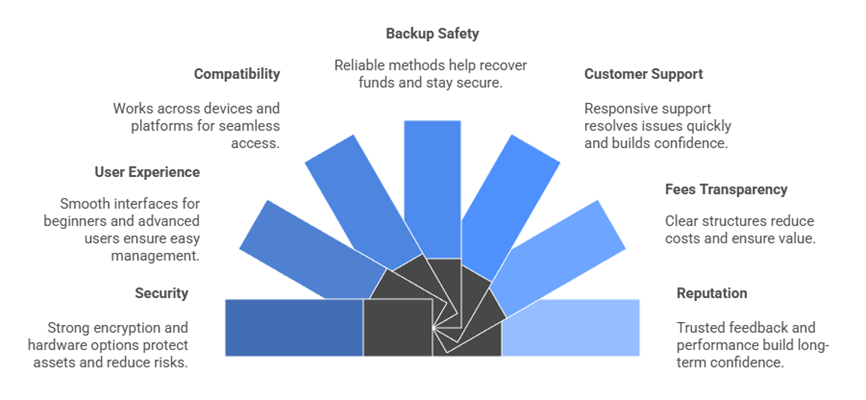
- Security: Our team chose based on strong security encryption hardware options to protect assets and reduce risks for all users.
- User Experience: We made sure to shortlist wallets offering interfaces great for beginners and advanced users so management remains smooth and reliable.
- Compatibility: Experts in our team selected wallets compatible across devices platforms ensuring access works flawlessly anywhere you need it.
- Backup Safety: We chose based on reliable backup methods to help recovery processes so you avoid losing funds and stay secure.
- Customer Support: Our team chose wallets providing responsive support helpful to resolve issues quickly which improves confidence for users trading.
- Fees Transparency: We made sure to consider transparent fees structures that reduce costs and ensure value for every crypto transaction.
- Reputation: Experts shortlisted wallets with trusted reputation community feedback consistently reliable performance so you gain confidence over the long term.
How to Set Up a Crypto Wallet?
You set up a crypto wallet by choosing the wallet type (exchange/custodial, app wallet, or hardware), installing or registering with a trusted provider, securing your account or recovery phrase, and then funding it with a small test transaction first. The exact steps differ slightly between hosted (exchange) wallets and self‑custody wallets like MetaMask, Trust Wallet, or hardware devices.
Step 1: Choose wallet type
- Custodial (exchange) wallet: Easiest for beginners; created automatically when you open an account on a crypto exchange and pass KYC.
- Non‑custodial (self‑custody) app wallet: You control your keys using apps like MetaMask, Trust Wallet, Coinbase Wallet, etc.
- Hardware wallet: A physical device (e.g., Ledger, Trezor) for maximum long‑term security, but with more setup steps.
Step 2: Set up a custodial wallet (exchange)
- Choose a reputable exchange that supports your country and desired coins (e.g., Coinbase, Binance).
- Create an account with email/phone, set a strong unique password, and enable 2FA (authenticator app preferred).
- Complete KYC (ID verification) if required; the exchange then creates a hosted wallet address for each supported asset automatically.
Step 3: Set up a non‑custodial app wallet
- Download a trusted wallet app from the official website/store (e.g., MetaMask, Trust Wallet, Coinbase Wallet).
- Create a new wallet; the app will generate a 12–24 word recovery (seed) phrase—write it on paper, store offline, and never share or screenshot it.
- Confirm the phrase inside the app, set a strong local password/PIN, and then copy your public wallet address to receive funds from an exchange or another wallet (start with a small test send).
Step 4: Set up a hardware wallet
- Buy a device only from the official brand (e.g., Ledger, Trezor) or authorized resellers.
- Connect it to your computer/phone and install the official companion app; initialize a new wallet and write down the recovery phrase shown on the device screen.
- Create a PIN on the device, then receive crypto by sending from an exchange or software wallet to the hardware wallet address, again starting with a small test amount.
Basic Safety Tips for Crypto Wallet
- Never share your seed phrase or private key; support staff and apps never need it.
- Always test with a small transaction before moving large amounts, and double‑check the network (e.g., Ethereum vs BSC) and address.
- Consider keeping spending funds in a mobile/extension wallet and long‑term holdings in a hardware wallet.
What are the Risks of Crypto Wallet Storage?
Storing digital assets comes with real risks. Understanding them helps you protect your money with confidence. I always suggest knowing what could go wrong before choosing any wallet.
Key risks in crypto wallet storage include:
- Loss of Private Keys
A private key is like a master password. Once lost, access to your crypto is gone forever. There is no reset button. - Hacking and Malware Attacks
Online wallets can be targeted by cybercriminals who steal keys or send fake transactions. Even a small security gap can lead to big losses. - Phishing Scams
Fraudulent websites or emails can trick users into revealing login info. Many beginners fall for these copycat platforms. - Device Theft or Damage
If a phone or hardware wallet is stolen or broken without backups, coins may become unreachable. - Human Error
Sending funds to the wrong address or storing recovery phrases in unsafe places can lead to permanent loss. - Dependence on Third Parties
Custodial wallets hold keys for you. If the provider gets hacked or shuts down, your assets could be at risk. My advice is to know who controls your keys.
FAQs
Do crypto wallets actually store crypto?
No. Crypto wallets don’t hold coins physically. Your crypto stays on the blockchain. Wallets store and manage private keys that prove ownership and allow transactions. When you “send” crypto, the wallet signs a transaction with your key, updating balances recorded on the blockchain. It’s access control, not storage.
What is a private key and why is it important?
A private key is a secret cryptographic code granting control over your crypto. Anyone who has it can spend your assets. It’s like a digital signature and must be protected. Losing it means losing access forever. Sharing it puts your funds at risk, making private key security crucial.
What’s a seed phrase?
A seed phrase (usually 12–24 words) is a human-readable backup of your wallet’s private keys. It can regenerate your wallet on any compatible device. If you lose your device, the seed phrase restores access. If someone else gets it, they own your crypto. Always store it securely offline.
Is a crypto wallet safe?
Safety depends on wallet type and how you protect keys. Hardware and offline wallets are highly secure from hacks. Online wallets are more convenient but exposed to cyber risks. Strong passwords, 2FA, backups, and avoiding phishing are key. The main threat isn’t the tech—it’s user mistakes.
Are crypto wallets anonymous?
Crypto wallets are pseudonymous, not fully anonymous. Wallets use public addresses instead of personal names, but transactions on most blockchains are traceable. If your identity links to an address—through an exchange or payment—your activity can be tracked. Privacy-focused tools or coins are needed for deeper anonymity.
What is a custodial vs. non-custodial wallet?
Custodial wallets are managed by companies holding your private keys for you—easy but requires trust. Non-custodial wallets give you full control of keys and funds, improving security and ownership but adding responsibility. “Not your keys, not your crypto” highlights that custody determines true control.
Which crypto wallet is best?
The best wallet depends on usage. Hardware wallets like Ledger or Trezor are top for security. Mobile or browser wallets like MetaMask or Coinbase Wallet offer flexibility for Web3. Beginners may prefer user-friendly custodial options. Choose based on security needs, supported assets, and how you interact with crypto.
Is Binance a crypto wallet?
Binance is primarily a centralized crypto exchange, not just a wallet. It includes a custodial wallet where Binance controls your private keys. They safeguard and manage assets but you rely on their security. For personal control, users often withdraw funds to non-custodial wallets like hardware devices or apps.