Key Takeaway
MetaMask is a popular self-custody wallet for Ethereum users. It supports swaps and Web3 logins. Many traders pair it with tools like Uniswap, OpenSea, and Etherscan. These tools can improve research and execution for beginners.
- MetaMask is a hot wallet, which stays connected online.
- It works as a browser extension and mobile app.
- You control your private keys, not an exchange.
- It is best for DeFi, NFTs, and dApp access.
MetaMask looks simple, but mistakes can get expensive. Using fake apps can drain funds fast. Bad links can trigger approvals you did not expect. Wrong networks can cause confusion and lost time. Poor gas settings can lead to failed transactions. As a trader, I suggest starting slow and staying cautious. Proper tools reduce errors and protect your assets. This review helps you judge MetaMask honestly. It also helps you choose trusted options confidently.
MetaMask Wallet Review – Brief overview of MetaMask
What Is MetaMask?
MetaMask is a well-known crypto wallet that works as a browser extension and mobile app. It helps users store, send, and receive digital assets safely. I have seen MetaMask grow with the rise of DeFi and NFTs, mainly because it is simple and flexible.
Why MetaMask is so popular:
- Easy setup for beginners
- Works with Ethereum and many layer-2 networks
- Direct access to DeFi apps and NFT marketplaces
Who this review is for:
- Beginners who want a first crypto wallet
- DeFi users managing tokens and swaps
- NFT traders buying or selling digital art
What this review will cover:
- Security features and risks
- Fees and network costs
- Ease of use on desktop and mobile
- Pros and limits compared to other wallets
My goal is to explain MetaMask clearly so you can decide with confidence.
How MetaMask Works

MetaMask works as a bridge between your web browser and blockchain networks like Ethereum. It allows users to store crypto, manage tokens, and interact with decentralized apps in one place. The wallet runs as a browser extension or mobile app, which makes access quick for beginners.
When you install MetaMask, it creates a wallet using a secret recovery phrase. This phrase controls access to your funds, not MetaMask itself. That means you stay in control at all times. In my experience, this non-custodial setup is one of its strongest points.
Here is a simple breakdown of how it functions:
- It stores private keys locally on your device.
- It connects to blockchain networks using secure nodes.
- It signs transactions before sending them to the network.
- It acts as a login tool for Web3 websites.
When you use a decentralized app, MetaMask asks for permission to connect. After approval, it shows transaction details clearly. You can check gas fees, token amounts, and network choice before confirming. This step helps avoid common mistakes.
Compared to centralized wallets, MetaMask gives more freedom but also more responsibility. You manage security yourself. I suggest beginners start with small amounts to get comfortable. Overall, MetaMask works best for users who want direct access to the Web3 ecosystem with clear control over their assets.
MetaMask Wallet: Supported Blockchains & Networks
In this MetaMask Wallet Review section, I explain the blockchains and networks MetaMask supports today. MetaMask mainly works with Ethereum, but its real strength is flexibility. It connects easily with many Ethereum-compatible networks. This makes it useful for both beginners and advanced users.
Supported networks include:
- Ethereum mainnet for core DeFi and NFTs
- Layer 2 networks like Arbitrum and Optimism for lower fees
- Polygon for faster and cheaper transactions
- Binance Smart Chain with manual setup
- Custom EVM networks added by users
In my experience, this wide support helps users move across ecosystems without changing wallets.
MetaMask: Supported Cryptocurrencies & NFTs
MetaMask supports a wide range of cryptocurrencies that run on Ethereum and other EVM-compatible networks. This makes it flexible for everyday crypto use. In my experience, this broad support helps beginners avoid switching wallets often.
You can store and manage:
- Ethereum (ETH)
- ERC-20 tokens like USDT, USDC, and DAI
- Tokens on networks such as BNB Chain, Polygon, and Arbitrum
MetaMask also supports NFTs. These include ERC-721 and ERC-1155 standards. NFTs appear directly inside the wallet with basic details. My focus is that MetaMask suits users who want one wallet for both tokens and NFTs, without extra tools.
Key Features of MetaMask
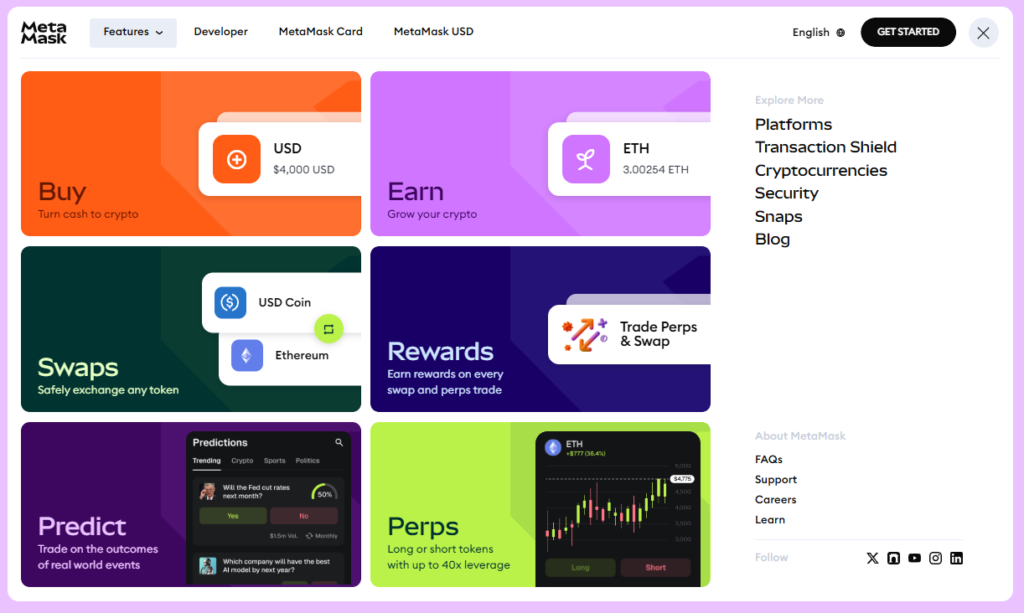
- Self-Custodial Wallet: MetaMask is a non-custodial wallet where users fully control their private keys and funds, enabling secure crypto management without relying on a third party for custody.
- Built-In Swap Aggregator: MetaMask Swaps aggregates DEX quotes so you compare prices inside the wallet. I recommend reviewing slippage and gas estimates before confirming aggregated swaps. It saved me time.
- DApp Gateway: MetaMask connects you with thousands of dApps from DeFi to NFTs. I previously used WalletConnect apps and found this smoother. Everything opens directly inside the wallet interface.
- Multi-Chain Support: MetaMask supports Ethereum and major EVM chains like Polygon and Arbitrum. Native Bitcoin support expands usage beyond traditional Ethereum focused wallets. This flexibility helps you manage diverse portfolios easily.
- NFT Management: MetaMask lets you view send and organize NFTs in one place. I managed testnet collectibles and mainnet art without switching tools. This simplifies daily NFT interactions for new users.
- Hardware Wallet Compatibility: MetaMask connects with Ledger and Trezor for cold storage security. I paired a Ledger during audits and reduced hot wallet exposure. This setup balances convenience with strong protection.
- Gas Fee Customization: MetaMask allows manual gas fee and priority adjustments for transactions. While using this feature one thing I noticed was savings during off peak hours. It balances speed and cost.
- Security Alerts: MetaMask simulates transactions and warns you about risky smart contracts. I relied on this when testing unfamiliar DeFi protocols. It adds a practical defensive layer.
- Portfolio Dashboard: MetaMask portfolio dashboard shows balances NFTs and history across accounts. I used it for quick snapshots before reporting holdings. This view reduces the need for third party trackers.
- Multi-Platform Access: Access MetaMask via browser extension or mobile app on iOS and Android, offering seamless usability whether you trade, hold, or explore Web3 from desktop or smartphone.
- Privacy-First Data Control: MetaMask gives you control over data sharing and privacy settings. It avoids centralized tracking while interacting with decentralized applications. That approach aligns well with Web3 principles.
MetaMask Fees Explained
| Fee Category | What It Is | Who Receives the Fee | Typical Cost / Range | Key Notes |
| Gas Fees (Network-Dependent) | Fees paid to blockchain validators/miners to process transactions | Blockchain network (e.g., Ethereum validators) | Varies widely (from cents to $50+ depending on network congestion) | MetaMask does not keep gas fees; they depend entirely on the selected network |
| MetaMask Swap Fees | Service fee for using MetaMask’s built-in token swap aggregator | MetaMask | ~0.875% of swap amount | Automatically included in swap quote; helps fund MetaMask development |
| Fiat Purchase Fees | Fees when buying crypto with credit/debit card or bank transfer | Third-party providers (MoonPay, Transak, etc.) | ~1%–5%+ depending on provider & payment method | MetaMask only acts as an interface; fees vary by country and payment type |
| Custom Gas Fee Settings | Manual adjustment of gas price & priority | Blockchain network | Depends on settings chosen | Lower gas = cheaper but slower; too low may cause failed or stuck transactions |
| Tips to Reduce Transaction Costs | Cost-saving strategies | N/A | Can save significant fees | Use Layer-2s, transact during low congestion, avoid peak hours, compare swap routes |
Security & Privacy
Security and privacy are core parts of any crypto wallet, and MetaMask handles them fairly well. MetaMask is a non-custodial wallet, which means you control your private keys, not the company. Your keys stay encrypted on your device, protected by your password. This lowers the risk of server-side hacks. However, it also means full responsibility is on you. If you lose your secret recovery phrase, no one can restore the wallet.
From my experience, MetaMask works best when combined with good user habits. It supports hardware wallets, which adds a strong extra layer of protection. On the privacy side, MetaMask does collect limited usage data by default, mainly for performance and fraud prevention. The good part is that you can turn this off in settings. Compared to many browser wallets, MetaMask offers solid transparency and control for everyday users.
Check out MetaMask Security Report
User Experience & Interface
MetaMask offers a clean, functional, and security-focused user experience (UX) and user interface (UI) across its browser extension and mobile app. The interface is minimalistic and intuitive, emphasizing key functions like sending, receiving, and swapping crypto, with a clear dashboard that displays balances, transactions, and network details. Its visual design uses a neutral color palette and clear iconography, creating a professional yet approachable feel.
While workflows are predictable and transparent, helping users confidently manage assets and interact with dApps, onboarding and blockchain terminology (e.g., gas fees, networks) can still pose challenges for beginners. Recent updates have improved the portfolio view, transaction clarity, and onboarding flow, reflecting MetaMask’s ongoing efforts to make Web3 more accessible and user-friendly.
MetaMask Mobile App Review
| Aspect | Android (Google Play) | iPhone (Apple App Store) |
| Overall Rating | ⭐ ~4.6 / 5 (approx.) according to aggregate stats from app marketplace tracking sources. | ⭐ ~4.8 / 5 according to App Store metrics. |
| User Sentiment – Positive | ✔ Many users find it secure and flexible as a crypto wallet. | ✔ Many users praise ease of use, security, and functionality. |
| User Sentiment – Negative | ✖ Some complain about slowness of the app or performance lags. | ✖ Some historical/older reviews mention bugs and syncing issues. |
| Common Complaints | – Slow performance occasionally reported. – Some security concerns (user error vs app behavior). | – Reports of bugs where transactions or features didn’t behave as expected. |
| Common Praises | – Trusted by many users to store, swap, and manage crypto. | – High satisfaction with security and usability among many users. |
Pros and Cons of MetaMask
Pros
- As per my experience it connects to almost every decentralized application
- It allowed me to swap tokens across multiple blockchains very quickly
- The Snaps feature provided me with native support for Bitcoin assets
- I benefitted from using the advanced gas controls for urgent transactions
- It helped me access private keys stored safely on my device
- I could access the built-in bridge to move funds between networks
Cons
- The 0.875% service fee for internal swaps felt quite high to me
- It offered me no native two-factor authentication for additional account security
- The browser extension sometimes slowed down my computer during heavy use
- As per my experience the mobile app lacks some extension features
- I received no direct human support when troubleshooting a complex error
- Managing many custom RPC networks became quite cluttered for my workflow
MetaMask vs Other Crypto Wallets
When comparing MetaMask with other crypto wallets, the biggest difference comes down to control, flexibility, and daily use. MetaMask is a non-custodial wallet. This means you control your private keys, not a company. Many beginners like this once they understand basic security.
MetaMask works best for Ethereum and EVM-compatible networks. It connects smoothly with DeFi apps, NFT marketplaces, and Web3 games. This makes it a strong choice for users who interact with decentralized platforms often. In my experience, the browser extension gives faster access to dApps than most mobile-only wallets.
Now compare this with Trust Wallet. Trust Wallet supports more blockchains out of the box. It is easier for holding many assets but feels less powerful for advanced DeFi actions. MetaMask offers deeper network customization, which experienced users value.
Coinbase Wallet focuses on simplicity and brand trust. It suits beginners who already use Coinbase. However, MetaMask gives more freedom without linking to an exchange account. This matters if privacy is a priority.
Hardware wallets like Ledger offer stronger offline security. MetaMask cannot match that alone. Still, MetaMask can connect to Ledger, combining ease of use with added protection.
Overall, MetaMask stands out for Web3 access and flexibility. It may feel complex at first, but the long-term control is worth it. I only suggest MetaMask if users are ready to learn basic wallet safety.
Who Should Use MetaMask?
| User Type | Unbiased Explanation |
| DeFi Users | MetaMask suits DeFi users who interact with lending, staking, and swapping platforms on Ethereum and related networks. It connects easily to most DeFi apps and gives full control over funds. However, users must understand gas fees and transaction approvals. This wallet does not protect you from costly mistakes. |
| NFT Traders and Collectors | NFT traders benefit from MetaMask because it works smoothly with major NFT marketplaces. It allows direct minting, buying, and transferring NFTs. Still, scams are common in NFT spaces, and MetaMask will not warn you in every case. Caution is required. |
| Web3 Developers | Developers often rely on MetaMask for testing smart contracts and switching between test networks. It is flexible and widely supported. I use it for quick testing, but it is not designed for enterprise level security setups. |
| Beginners Exploring Ethereum | Beginners can use MetaMask to learn how Ethereum works. The interface is simple, but the responsibility is high. New users should start with small amounts only. |
| Who Should Avoid MetaMask | MetaMask is not ideal for users who want strong customer support, password recovery, or a hands-off crypto experience. If managing private keys feels stressful, a custodial wallet may be safer. |
Step-by-Step: How to Set Up MetaMask
Before you start
- Use only the official MetaMask app/extension.
- Never share your Secret Recovery Phrase (12 words). Not with “support,” not with anyone.
Option A: Set up MetaMask on your phone (iOS/Android)
- Install MetaMask
Go to the App Store / Google Play and search “MetaMask”.
Install the app published by MetaMask. - Open the app → Create a new wallet
Tap Create a new wallet (or Get started). - Set a password
This password unlocks the app on that device. - Back up your Secret Recovery Phrase
Choose Reveal Secret Recovery Phrase.
Write the 12 words down offline (paper is best).
Confirm the words in the correct order when prompted. - You’re done
You’ll land on your wallet home screen with your account address.
Option B: Set up MetaMask on desktop (Chrome/Brave/Edge/Firefox)
- Install the browser extension
Go to the official MetaMask site and click Download.
Choose your browser and add the extension. - Create a wallet
Open the MetaMask fox icon → Create a new wallet. - Create a strong password
Again: this is for local unlock, not your master key. - Save the Secret Recovery Phrase
Reveal it, write it down offline, and confirm it. - Pin the extension
Pin MetaMask in your browser toolbar so you can always find it.
Option C: Already have a wallet? Import it instead
If you already have a MetaMask (or any wallet that gave you a 12/24-word phrase):
- Choose Import wallet (instead of Create).
- Enter your Secret Recovery Phrase.
- Set a new device password.
Common Issues & Troubleshooting
Even a popular wallet like MetaMask can run into problems. Over the years, I have seen the same issues appear again and again. The good news is that most of them are easy to fix if you know what to do.
Issue: MetaMask not connecting to a website
Solution: This often happens because of browser cache or permission issues. Try refreshing the page first. If that fails, disconnect the site from MetaMask and reconnect it. Also check that you are on the correct network, such as Ethereum Mainnet or another supported chain.
Issue: Transaction stuck or pending for a long time
Solution: This usually means the gas fee was set too low. You can speed up the transaction inside MetaMask by increasing the gas fee. If it stays stuck, resetting the account activity often helps. This does not affect your funds.
Issue: Tokens not showing in the wallet
Solution: Many tokens must be added manually. Copy the token contract address from a trusted source and add it to MetaMask. The balance usually appears right away.
Issue: Wallet balance shows zero
Solution: Double-check the selected network. Funds on one network will not show on another. I always remind users to switch networks before panicking.
Final Verdict: Is MetaMask Worth Using?
Yes, MetaMask is absolutely worth using, especially if you’re active in the Ethereum and Web3 ecosystem.
MetaMask has earned its reputation as the go-to wallet for Ethereum-based applications, offering unmatched compatibility with DeFi platforms, NFT marketplaces, and Web3 services. Its non-custodial design gives users full control over their assets, while its browser extension and mobile app make interacting with decentralized apps seamless.
That said, MetaMask is not a perfect all-in-one wallet. It doesn’t support Bitcoin natively, relies heavily on user security practices, and can be intimidating for complete beginners due to gas fees and network management. However, these drawbacks are common among self-custody wallets and are outweighed by MetaMask’s flexibility and ecosystem dominance.
Frequently Asked Questions (FAQ)
Is MetaMask safe?
MetaMask is generally safe when used correctly. It’s a non-custodial wallet, meaning you control your private keys. Security depends on protecting your seed phrase, avoiding phishing sites, and keeping your device malware-free.
Is MetaMask free?
Yes, MetaMask is free to download and use. You won’t pay for creating or storing a wallet. However, you’ll still pay blockchain network (gas) fees and optional swap fees when making transactions.
Can MetaMask be hacked?
MetaMask itself hasn’t been “hacked” at the protocol level, but users can be compromised through phishing, fake extensions, or malware. Most losses happen due to leaked seed phrases or signing malicious transactions, not MetaMask failures.
Does MetaMask support Bitcoin?
MetaMask does not natively support Bitcoin. It’s built for Ethereum and EVM-compatible blockchains. You can access Bitcoin only indirectly through wrapped tokens (like WBTC) or by bridging, which adds complexity and risk.
What happens if I lose my seed phrase?
If you lose your seed phrase, you permanently lose access to your wallet and funds. MetaMask cannot recover it for you. This is why securely backing up your recovery phrase offline is absolutely critical.
Can I use MetaMask with a hardware wallet?
Yes, MetaMask works with hardware wallets like Ledger and Trezor. This setup keeps your private keys offline while using MetaMask as the interface, significantly improving security for long-term or high-value crypto storage.